



NetScaler Console, previously ADM and before that NetScaler MAS, has long been useful for managing appliances, collecting data and seeing what your NetScaler’s are doing. But if you only had a pair of appliances, did you really need another system to manage them?
For many environments, it was easy to leave it out – it was just another piece to run(compute) and maintain.
The move to License Activation Service (LAS) made that harder, although offline activation still offered a way to license appliances without Console. So, technically, you could continue without it.
A call to action
By October 2026, Citrix had disclosed 18 NetScaler ADC and Gateway vulnerabilities this year, Six were rated Critical. March brought a memory overread vulnerability, August brought an authentication bypass, and September added two remote code execution vulnerabilities and critical HTTP request smuggling while October brought SAML memory buffer overruns. Exploitation of both September RCE vulnerabilities had already been observed. That is a considerable amount of checking, patching, and checking again, with three months still left in the year.
If Console is still on your “we’ll get around to it” list, it is time to revisit that decision.
Which appliances need attention?

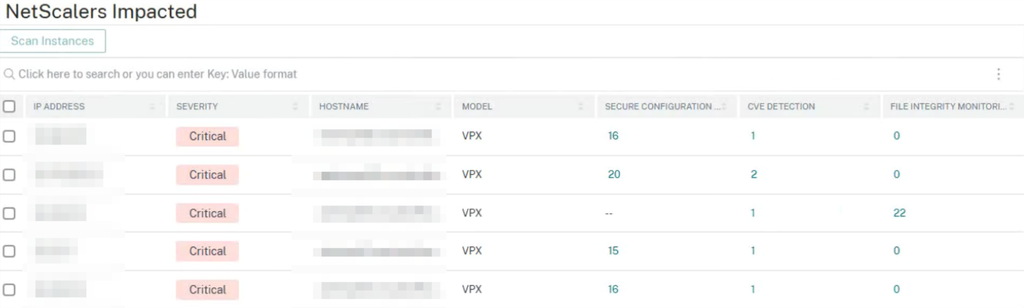
When a security advisory arrives, you will be checking firmware versions, reading configuration requirements, and working out which customers need changes. If you manage multiple environments, there can be quite a bit of work before you even start upgrading anything.
NetScaler Console’s Security Advisory helps here, showing supported CVEs, affected appliances and the required remediation in one place. Citrix has also made applying supported configuration remediations easier through Configuration Jobs, reducing the need to work through each appliance individually.
The September advisory gives us a good example. CVE-2026-88778 requires a configuration change as well as a firmware update. After the upgrade is complete, the appliances are healthy, and users are connected , and at that time it would be easy to close the change ticket, but that would not complete the mitigation.
Having that requirement visible alongside the vulnerability, with a job to apply the configuration change, makes it much harder to miss. We still need to review what we are changing and verify the result, but Citrix has made the work considerably easier.
We’ve patched. Were we compromised?
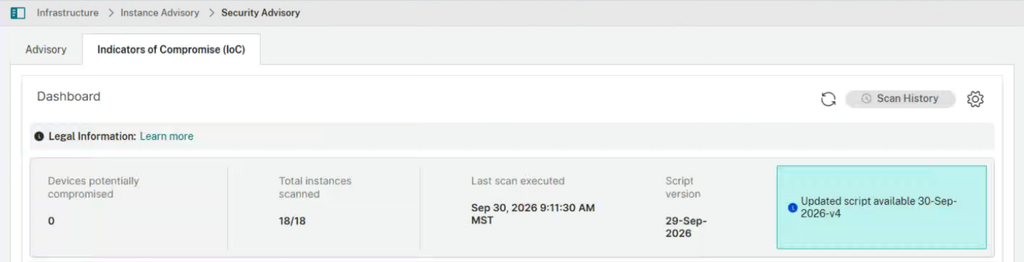
We’ve addressed the vulnerability, but what happened while the appliance was exposed?
Console’s new Indicators of Compromise (IoC) detection feature gives administrators a way to run checks directly from Security Advisory, review the results and retain the history. Citrix then updates the detection logic as additional indicators are discovered.
Previously, getting those checks could involve opening a support ticket and working through the process with Citrix. Having them available in Console means we can get started sooner, with the results available to review across our managed appliances.
A result showing no compromise detected doesn’t guarantee the appliance is clean. But it gives us useful information to work with, and a check I would want available in any production environment.
Still optional?
From a product dependency standpoint, yes. Citrix hasn’t made NetScaler Console mandatory for every deployment. But we now have CVE detection, configuration remediation and IoC checks available through the same tool. Even for a single pair of appliances, that’s a compelling reason to use it.
Deploying NetScaler Console alone isn’t enough. Connect the appliances, configure the required connectivity and telemetry, verify the scans work, and include the results in your regular reviews. For me, NetScaler Console now belongs in every NetScaler implementation and managed service, regardless of how the appliances are licensed.
We’ve spent enough time finding out what needs fixing during an emergency. NetScaler Console should be ready before the next advisory arrives. If your team needs help assessing, patching or proactively managing its NetScaler estate, explore Insentra NetScaler Support.